Shasta College Employer Summit
Beyond ChatGPT: The AI Shift Every Business Needs to Understand
Practical Tools, Human Leadership
Practical Tools, Human Leadership
A two-hour journey exploring AI as a business and leadership opportunity.
Five opportunity areas: productivity, communication, knowledge, operations, and intelligence.
Five levels: Awareness & Exploration, Internal Knowledge Assistants, Connected Systems, Augmented Dashboards, and Autonomous Workflows.
A simple canvas for matching AI roles, skills, tools, and human oversight.
Real AI projects and lessons learned. Use cases beyond marketing. Choosing tools wisely. Change management, risk, and guardrails.
Open conversation with panelists to address practical questions from the audience.
Where AI may create value in your organization. The point is to start seeing your organization differently.
Reduce administrative load, communicate clearly, summarize information.
Where are we spending too much time writing, summarizing, or organizing?
Create, refine, repurpose, and personalize communication.
Where do we need to communicate more clearly, consistently, or frequently?
Make sense of information you already have.
What information do we already have but are not fully using?
Support workflows, reduce delays and handoffs.
Where do things get delayed, duplicated, forgotten, or stuck?
See patterns, understand performance, create reports, develop internal tools.
What do we wish we could see, understand, or act on?
Each level of the adoption pathway maps to a more capable type of agent. Here's how it builds.
How AI capability evolves and what each level can support.
Who on my team is ready to start experimenting with assistants (Level 1 Agents)?
→ Prompt-based tools like ChatGPT, Grok, Gemini, or Claude that answer questions.
What internal knowledge, documents, SOPs, or emails could we expose to build simple assistants?
→ Example: An internal chatbot that helps employees find HR policies or IT steps.
Which tools would save time if your team could ask AI to take actions directly in them—update records, create tickets, generate reports?
→ CRMs, ticketing systems, ERP, project management tools.
→ Goal: Let users do, not just ask.
Where can we add agents that explain, narrate, and act on dashboard data in tools like Power BI or Excel?
→ Example: An Assistant/Agent that reads your metrics and drafts a performance summary.
What business goals could be achieved by agents that plan, act, reflect, and improve on their own?
→ Agents that handle email triage, generate reports, follow up with leads, schedule meetings, etc.
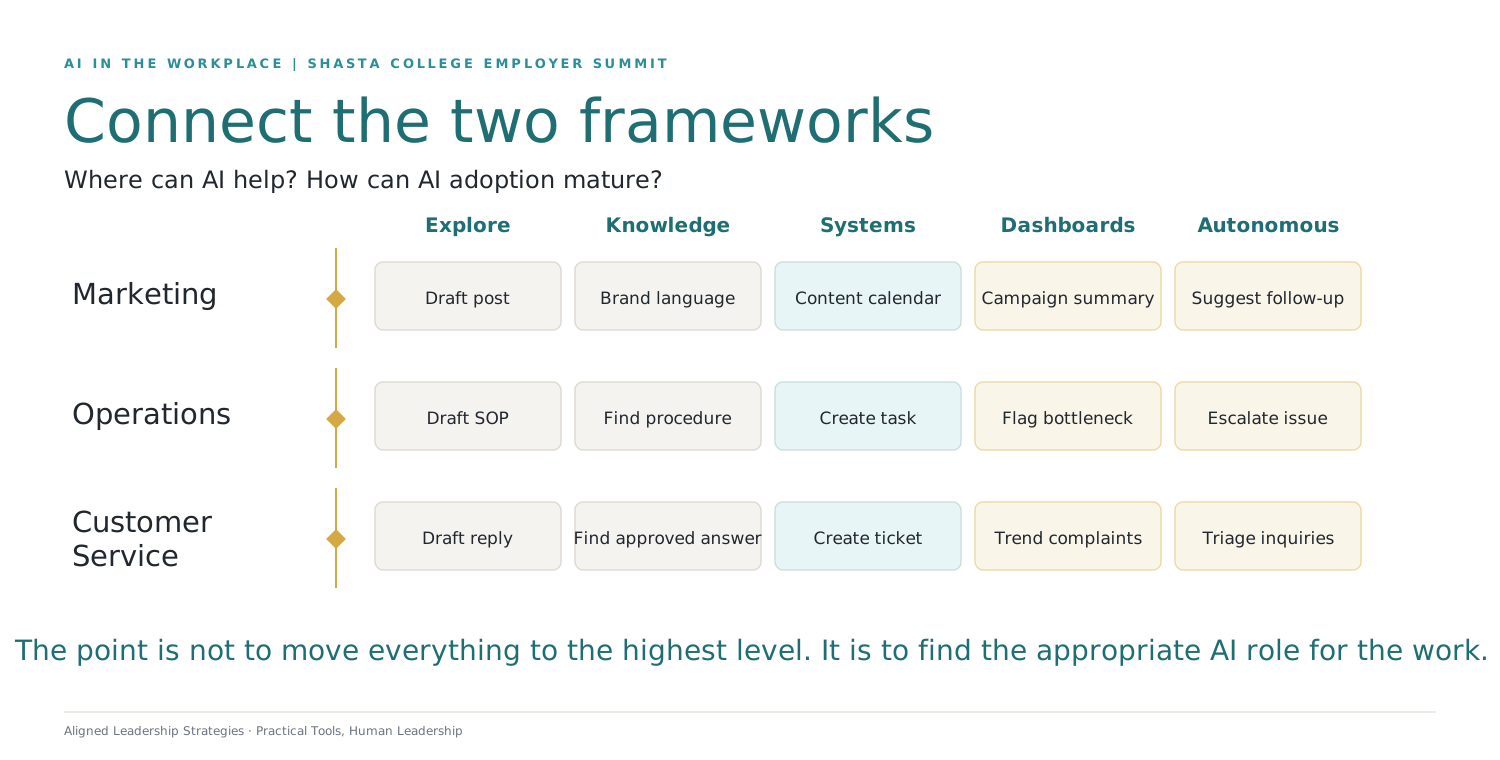
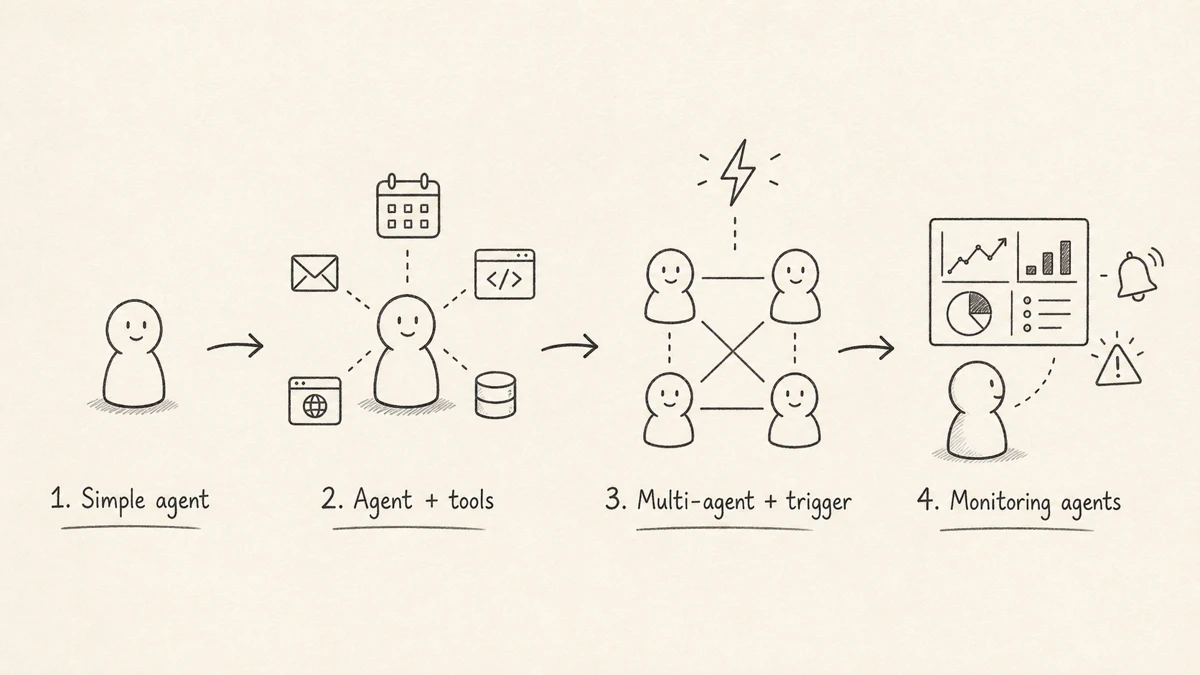
Understanding the type of AI agent you're working with helps you set the right expectations, design the right workflow, and know where human oversight is most important.
A standalone assistant. You give it a task, it reasons through the request, it responds.
Writing, summarizing, brainstorming, research, everyday knowledge work. It waits for your prompt.
The agent can now search the web, read files, query databases, update CRMs, send emails, and run reports.
Less like a chatbot, more like an operating layer across your software.
Multiple agents coordinate — one researches, one writes, one verifies, one checks for risks. A trigger starts the workflow.
A new lead enters the CRM → agents research, draft, check news, and prepare a brief. Agents begin to resemble teams.
These agents don't wait for a prompt. They watch for changes and act when something happens.
They monitor inboxes, contracts, tickets, inventory, dashboards. When a condition is met, they alert, summarize, recommend, or begin a workflow automatically.
What business process are you trying to improve?
Look for:
Repetitive tasks • Delays • Handoffs • Inconsistency • One-person dependency
If we could assign an AI helper, what would its job be?
Examples:
Follow-up assistant • Report generator • Classifier • Reminder system • Data analyzer
What repeatable tasks would the AI need to perform?
Examples:
Summarize • Draft • Compare • Flag • Update • Classify • Route
What systems would the AI need to access?
Examples:
Email • CRM • Calendar • Spreadsheets • Documents • Databases
Pick one workflow that's causing friction, then walk through the four stages with your team.
Now that we have looked at where AI can help, how AI capability is evolving, and how to think about workflows, we want to turn to a more important leadership question:
AI should not simply become a way to extract more productivity from people.
The opportunity is to use AI to reduce friction, improve decision-making, support better service, and free people for higher-value human work.
The more AI is able to act, the more leadership judgment matters.
That is where our panel comes in.
Before we bring the panel fully into the conversation, I want to give you a few minutes to apply this to your own organization.
While you are discussing at your tables, I will invite our panelists to come forward and get situated.
At your table, discuss the following:
How are you currently using AI in your business, if at all?
What is one area where you wish you had better information, reporting, or visibility?
What is one process that currently lives in someone's head and needs to be documented or systematized?
What is one repetitive task in your organization that consumes time but does not require much human judgment?
What is one concern you have about introducing AI into your workplace?
Choose one person at your table to share one practical AI opportunity or one concern if we have time during Q&A.
You will have about 7 minutes at your tables. Don't worry about whether you know the right tool yet. Start with the work. Where is there friction, repetition, missed insight, trapped knowledge, or concern?
Practitioners implementing AI in their organizations. Real examples, lessons learned, and practical guidance.
CEO, Sof-Tek
Technology Executive & Chief Architect
Founder, Blossom Lab Marketing
Founder & Principal, HÜGG Consulting & Development
Real, practical examples from the field. What did you create, test, or help someone use? What problem were you solving and what changed?
One working example and one failure story. What went wrong and what did you learn?
Operational value across finance, operations, customer service, HR, reporting, and automation.
Start with business problems, not tools. How to evaluate and adopt wisely.
How to introduce AI without creating fear. Involving employees. Protecting the career ladder.
Making sure AI supports people. What work should remain deeply human. Essential skills.
What to be careful about. Where human review is essential. AI guidelines every business needs.
How to decide what to tackle first. What makes a good first AI use case. How much time a team should expect to spend learning and experimenting.
How to stay informed without overwhelm. Balancing experimentation with focus.
Overarching Theme: The best organizations identify real business problems first, then ask what AI support (if any) could help. This is not a tools conversation—it's a leadership conversation.
The best AI strategy does not start with the tool. It starts with the business problem, the workflow, and the people affected.
The greatest value of AI is not replacing people, but helping people become more effective, creative, and impactful.
The more AI moves from answering to acting, the more important human oversight becomes.
You do not need a massive budget or technical team to begin. The best first step is usually a small, low-risk, useful experiment.
AI adoption is a change management issue. How leaders communicate, involve employees, and create guardrails will shape whether AI builds trust or fear.
Not this
"What AI tool should I use?"
Start here
"Where is there friction, repetition, confusion, or missed insight in my organization?"
So before you leave, I want you to think about one possible 30-day AI pilot.
Improving one workflow
Reducing one repetitive task
Creating one report or summary
Documenting one process
Drafting one AI-use guideline
Training one team
Testing one low-risk use case
What workflow do we want to improve?
What role could AI play?
What repeatable skills would it need?
What tools, systems, or information would it need?
Where should a person review or approve the work?
How will we know if it helped?
Access the presentation, frameworks, panelist insights, and event recording.
Visit: AlignedLeadershipStrategies.com
Hope Seth
Aligned Leadership Strategies
hope.seth@gmail.com
AlignedLeadershipStrategies.com